// SECURE ACCESS · MONTHLY KEY
Your key unlocks the dashboard for the month. Email Kontaktmrln@gmail.com to get next month's key. Your financial data never leaves this device.
New here? See what MRLN is
🍏 Add to iPhone
  1. Open this page in Safari.
  2. Tap the Share button ⬆️.
  3. Tap “Add to Home Screen.”
🤖 Add to Android
  1. Open this page in Chrome.
  2. Tap the ⋮ menu (top-right).
  3. Tap “Install app” (or “Add to Home screen”).
Step 1 of 5
🌐
// Personal Finance Command Center

MRLN

Operator · Status: ACTIVE
AGE WORK GRADE
Left this month
kr
What's left after every bill and any debt payment, in a typical month — before you move money to savings.
If your income is…
Low Month
Typical
High Month

Mission Briefing

Your whole plan in one screen. Built from your own figures — income, bills and subscriptions. Every number below is computed from one shared model, so the tabs always agree.
  • Goal: Stop living paycheck-to-paycheck and know exactly where your money goes.
  • Reality check: Even a slow month leaves after every cost and any loan payment.
  • The plan: Spend with confidence, then move your savings amount automatically each month.
What's left after every bill and any debt payment, before you move money to savings. Comfort money after savings: . This is the "spend without doing checkout math" number.

Your Income

Your monthly take-home (after tax). Change these anytime with ⚙ Setup or 🤖 Assistant MRLN.
ScenarioPer month
A slow month
Typical month
A good month
Your simulators and savings projection use the typical month as the baseline.
✎ To change your income, use Assistant MRLN — just type it plainly, like "I earn 18000 a month".

📈 Income history

Log what you actually get paid each month and MRLN sets your low, typical and high from the real numbers — no bank connection, everything stays on your device.

🧾 Tax Helper

An offline estimate of your income tax — what you'll pay, what to expect back, and (Denmark) what to set on your forskudsopgørelse. Adapts to your country/region. Adjustable but unofficial — always verify with your tax authority. Your numbers stay on your device.

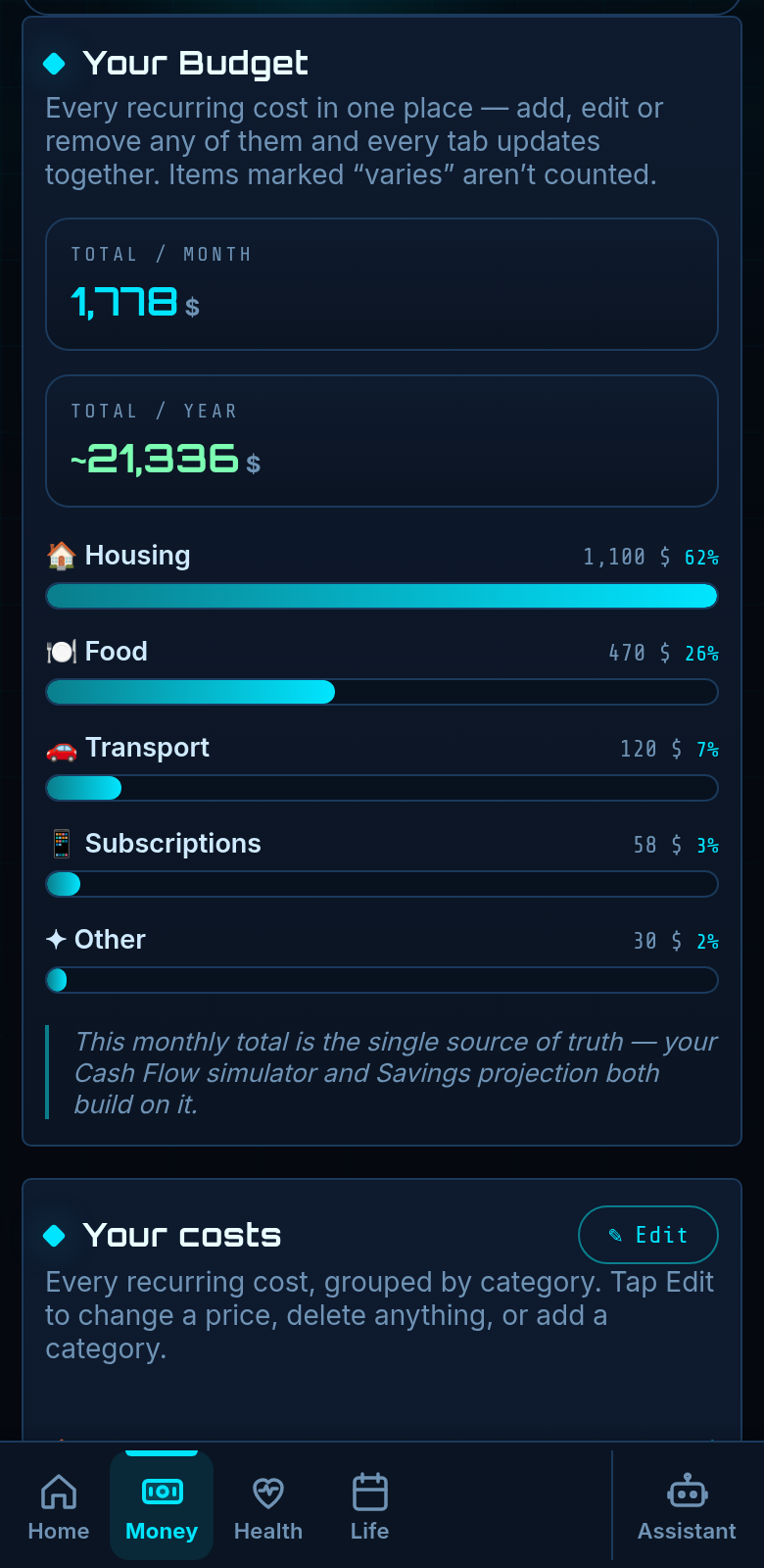
Your Budget

Every recurring cost in one place — add, edit or remove any of them and every tab updates together. Items marked “varies” aren’t counted.
Total / month
kr
Total / year
kr
This monthly total is the single source of truth — your Cash Flow simulator and Savings projection both build on it.

Add a cost

Add anything new to a category. It updates your live numbers everywhere — grand total, cash-flow simulator and savings projection all recompute instantly.

Your costs

Every recurring cost, grouped by category. Tap Edit to change a price, delete anything, or add a category.

Loan & Debt

Your loan or debt repayment. The toggle controls whether it's counted in your cash-flow math — turn it off if you don't currently have a loan, so your "left over" stays correct.
Monthly payment
Savings target
In cash-flow math?

Cash-Flow Simulator

Slide to test any income level. It subtracts your recurring costs and any debt payment, then shows what's left and what's truly free to spend.
Income (after tax)
Recurring costs (all your bills & subscriptions)
Loan / debt payment
LEFT OVER
↳ Savings transfer
FREE TO SPEND
Slide to see any month.

Savings Growth — 8 Year Projection

How your savings pool grows month by month if you stick to the rule. The income scenario changes the curve: each month you bank your savings transfer plus 30% of that month's spare money (the rest is yours to spend). Good months save more, low months save less.
INCOME SCENARIO
Saved per month in this scenario (match + 30% of comfort)
After 1 year
After 3 years
After 8 years
Any emergency cushion or borrowed money you hold sits separately and isn't counted here — this is money you build on top of it.

📜 Rules for building wealth

A few simple habits do almost all the work — follow these and the savings boxes below fill themselves.
  • Pay yourself first. The day you're paid, auto-move a fixed amount into savings — before you can spend it.
  • Then spend guilt-free. Whatever's left after that transfer is genuinely yours to spend.
  • Build a buffer first. Set aside 3 months of costs before anything else — it stops one bad month undoing you.
  • Make it earn. Keep savings in a high-interest account so compounding grows it for you.
  • Clear pricey debt first. Paying off high-interest debt beats saving at a lower rate — it's a guaranteed return.
  • Bank your good months. When a month leaves something spare, top up a box instead of letting it drift away.
Make each transfer automatic on payday — never rely on willpower. The boxes below show exactly what it grows into.

💰 Savings Boxes

Make a box for each thing you're saving for — a holiday, a new phone, an emergency cushion. Tell it what it holds now and what you add; it shows what it becomes and what the interest earns you.

📈 What it becomes

in 5 years

Good things to save for

  • A 3-month emergency cushion.
  • A holiday you don't have to put on a card.
  • The next phone / laptop, bought in cash.
  • A deposit, a car, or just future-you's freedom fund.

Your Life Tier

An honest, realistic read on your money life — built only from your own numbers. Stats & Grades shows the factor-by-factor breakdown behind it.
Add your income and costs to unlock your tier.

Your Checklist

Your own list — add anything you want to get done. It saves with your data, on your device only.

    Body Stats

    Your numbers power the calorie simulator below. All optional — fill in what you know. Everything saves with your file.
    BMI
    BMR · at rest
    Maintenance · TDEE
    Enter height, weight, age and sex to see your numbers.

    Body Grade & Shape

    Your stats vs the optimal for your age, height & sex, and your muscle-to-fat balance. Drag the weight simulator to watch your shape change.
    Add height, weight, age & sex above to see your grade.
    Healthy weight
    Target body fat
    Muscle : fat
    Simulated weight
    vs your healthy range

    Body Measurements — optional, for accuracy

    Feed the model your real measurements and the figure above gets truly you. All in cm (shoe = EU size). Leave any blank to use a smart estimate.
    The more you give, the closer the figure matches your real proportions — wingspan sets your reach, the "around" numbers set each limb's thickness.

    Calorie Simulator

    Drag to test any daily intake. It compares to your maintenance and shows what happens — steady fat loss, muscle gain, or a danger zone.
    QUICK GOAL
    Daily intake
    Your maintenance (TDEE)
    SURPLUS / DEFICIT
    Projected weight change
    Set your body stats above, then drag the slider.
    Protein target / day
    Lean body mass

    Meal Ideas

    Meals tuned to your body — your calorie & protein targets, your fat-to-muscle balance, and the physique you're chasing. We weight toward what you like, never suggest a dislike, and tell you how much to eat. Dislikes filter suggestions — they are not a medical allergen check. Tap any meal for full nutrition.

    Personal Records (PRs)

    Log your best lifts and watch them climb. We track your best per exercise and estimate your 1-rep max.

    Workouts / Training Split

    Map out your training days and exercises. Everything saves with your file.
    No workouts yet — add your first above.

    🍽️ Log a meal

    Snap a photo if you like, then type what you ate — we estimate the calories and macros from an offline food list. Rough by design; the more detail (amounts & units), the closer it gets.

    Today

    Your running total for today, against your target from the Gym tab.
    Calories
    0
    Protein
    0 g
    Carbs
    0 g
    Fat
    0 g
    Add a meal above to start today's log.

    History

    Everything you've logged, newest first. Saves with your file and stays on your device.

    Calendar

    Map out birthdays, events, and plans across any year. Use the arrows to move between months and years, click a day to open it, and pocket as many notes inside a day as you like. Everything saves with your file.

    Select a day

    Click any day in the calendar above to add notes to it.

    All Planned Items

    Everything you've noted, soonest first.
    Nothing planned yet.

    Reminders 🔔

    Pick a time and we'll play a sound to remind you — daily, while the HUD is open.

    Stats & Grades

    Every grade, what it means, and exactly why you got it — all from your own numbers. Each comes with a trusted source you can read. Grades run S → E.

    📒 Notebook

    Jot anything down — ideas, lists, passwords-hints, anything you don't want to lose. Notes save with your file and stay on your device. Nothing leaves it.

    🎬 Media Log

    Every film and show you've seen — rated and auto-ranked, so when someone asks your favourite you have an answer. Private, offline, yours.

    📥 To watch

    🏆 Ranked

    📦 Move my data

    New phone, or just installed the app? Bring everything across — it stays private to your devices and is never uploaded.

    📥 Bring my data onto this device

    Already tapped “Copy my data” on your other phone or browser? Tap below — we’ll find it and bring everything in.
    Can’t paste? Do it by hand
    Paste the data you copied, or pick the file you saved. This replaces what’s on this device.
    Moving a whole saved file
    Got a saved master / exported file (.html)? Load everything from it — income, expenses, notes, calendar and food log. Your private minting key is never imported.

    📤 Copy my data off this device

    Tap to copy your data, then open MRLN on your other device and tap “📋 Bring in my data”.
    Food photos aren’t in this copy — send them with “📤 Export my photos” below.
    Other ways to send (file, code)
    Photos move separately
    Move your data first (above), then move your photos here — they travel as their own file because food photos can be large.

    📥 Import from another app

    Pick a file your other apps export. We read it on your device — nothing is uploaded.

    📤 Export to other apps

    Send your data out as standard files other apps can open.

    📱 QR transfer

    Show a QR and scan it with another phone's camera — no typing. Best for short things (your access key, File ID, a link).

    Time on the HUD ⏱

    How long you've actively spent in here — it only counts while the tab is open and unlocked.
    Lifetime
    This session
    Day streak

    Latest update

    See what changed in the version you're on right now.
    Build

    Change Log 0

    An audit trail of every change ever made — add, edit, delete, export. Stored inside this file and carried into every export, so the full history travels with you. (When this becomes the hosted product, the same log lives on a real server.)
    loaded